

Eine praxisorientierte Einführung in das Model-Context-Protocol (MCP)
.png)
Da LLMs und KI-Agenten zunehmend leistungsfähiger werden, stoßen sie auf eine kritische Barriere: den konsistenten und standardisierten Zugriff auf aktuelle Informationen sowie spezialisierte Tools. Das von Anthropic entwickelte Model-Context-Protocol (MCP) adressiert diese Herausforderung, indem es eine vereinheitlichte Schnittstelle zwischen KI-Modellen und externen Ressourcen schafft. Diese Standardisierung eliminiert die Fragmentierung durch individuelle Integrationen und ermöglicht es Entwickelnden, Tools einmalig zu erstellen und mit jedem MCP-kompatiblen KI-System zu verbinden.
In diesem Blogbeitrag untersuchen wir die technischen Grundlagen des MCP und demonstrieren dessen Anwendung durch den Aufbau eines eigenen Wikipedia-Servers. Dieser ermöglicht es LLM-Agents, Wikipedia als strukturierte Wissensquelle zu nutzen.
Technische Übersicht
Das Model-Context-Protocol (MCP) ist eine standardisierte Kommunikationsschnittstelle, die entwickelt wurde, um die Interoperabilität zwischen KI-Sprachmodellen und externen Servern zu verbessern. Es etabliert eine strukturierte Methode für Sprachmodelle, um mit Ressourcen, Tools und Funktionen zu interagieren, die von externen Systemen bereitgestellt werden.
MCP basiert auf einem Client-Server-Modell, bei dem:
Clients: In der Regel KI-Modelle oder Anwendungen, in denen diese eingebettet sind
Servers: Externe Systeme, die den Modellen zusätzliche Funktionen bereitstellen
MCP-Server können Clients drei primäre Arten von Funktionen anbieten:
Resources: Bereitstellung von Kontext und Daten, auf die entweder der User oder das KI-Modell zugreifen kann
Prompts: Lieferung von vorlagenbasierten Nachrichten und strukturierten Workflows für vorgeschlagene User-Interaktionen
Tools: Bereitstellung von Funktionen, die KI-Modelle aufrufen können, um spezifische Aufgaben auszuführen
Clients können optional anbieten, LLM-Sampling-Anfragen des Servers zu erfüllen. Dies ermöglicht es dem Server, LLM-Funktionen und agentische Workflows zu nutzen, ohne eine direkte LLM-Abhängigkeit zu haben.
MCP-Server werden üblicherweise auf eine von zwei Arten bereitgestellt:
Local: Hier ist der Client für den Start des Servers verantwortlich und kommuniziert mit ihm über Stdio. Dies ist das übliche Setup für Desktop-Apps wie Claude Desktop oder Cursor.
Remote: Der Server wird separat gehostet und der Client kommuniziert mit ihm über das Netzwerk. Die neueste Version der Spezifikation schreibt Streamable HTTP als Transportweg vor. Eine ältere Version der Spezifikation sah stattdessen SSE (Server-sent-events) als Transport vor. Zum Zeitpunkt der Erstellung dieses Textes verwenden die meisten SDKs noch SSE und unterstützen Streamable HTTP noch nicht.
Aufbau eines Wikipedia-MCP-Servers
Nach diesem theoretischen Überblick wollen wir nun praktisch einen MCP-Server implementieren, um das Konzept in Aktion zu sehen.
Wir werden einen Server bauen, der unseren LLMs Zugriff auf Wikipedia als Wissensquelle ermöglicht. Dabei nutzen wir uv, um unser Projekt zu initialisieren und die Abhängigkeiten zu verwalten:
uv init --package example-mcp-server
uv add fastmcp pydantic requests wikipedia-api "smolagents[mcp,openai]"
Das Abrufen von Daten von Wikipedia ist dank der Wikimedia-API und des Python-Pakets "wikipedia-api" unkompliziert:
# ./src/example_mcp_server/wikipedia_client.py
import wikipediaapi

import requests

from pydantic import BaseModel, Field


class WikipediaPage(BaseModel):
    """Represents a Wikipedia page with its metadata and content."""

    title: str = Field(description="The title of the page")
    url: str = Field(description="The canonical URL of the page")
    summary: str = Field(description="A summary of the page content")
    sections: list[tuple[str, str]] = Field(
        description="List of section numbers and titles in the page"
    )
    content: str | None = Field(
        default=None,
        description="Full text content of the page, if requested"
    )


class WikipediaPageSection(BaseModel):
    """Represents a specific section of a Wikipedia page."""

    page_title: str = Field(description="The title of the parent page")
    url: str = Field(description="The URL of the parent page")
    section_title: str = Field(description="The title of the section")
    content: str = Field(description="The text content of the section")


class WikipediaSearchResult(BaseModel):
    """Represents a single result from a Wikipedia search query."""

    title: str = Field(description="The title of the page")
    wordcount: int = Field(description="The word count of the page")
    snippet: str = Field(description="Snippet showing the match context")


# User agent should respect Wikimedia policy:
# https://foundation.wikimedia.org/wiki/Policy:Wikimedia_Foundation_User-Agent_Policy
USER_AGENT = "Wikipedia MCP server example (https://dida.do/)"


class WikipediaClient:
    """Client for interacting with Wikipedia API."""

    def __init__(self) -> None:
        self._client = wikipediaapi.Wikipedia(
            user_agent=USER_AGENT,
            language="en",
            extract_format=wikipediaapi.ExtractFormat.WIKI,
        )
        self._api_url = "https://en.wikipedia.org/w/api.php"

    def get_page(
        self, page_title: str, include_full_text: bool = False
    ) -> WikipediaPage | None:
        """Retrieve a Wikipedia page by its title.

        Args:
            page_title: The title of the Wikipedia page to retrieve
            include_full_text: Whether to include full page content in result

        Returns:
            WikipediaPage object if the page exists, None otherwise
        """
        page_data = self._client.page(page_title)
        if not page_data.exists():
            return None

        sections = [
            (l, section.title)
            for l, section in _get_subsections(page_data.sections)
        ]
        return WikipediaPage(
            title=page_data.title,
            summary=page_data.summary,
            url=page_data.canonicalurl,
            sections=sections,
            content=page_data.text if include_full_text else None,
        )

    def get_page_section(
        self, page_title: str, section_title: str
    ) -> WikipediaPageSection | None:
        """Retrieve a specific section from a Wikipedia page.

        Args:
            page_title: The title of the Wikipedia page
            section_title: The title of the section to retrieve

        Returns:
            WikipediaPageSection if the page and section exist, None otherwise
        """
        page_data = self._client.page(page_title)
        if not page_data.exists():
            return None

        sections = page_data.sections_by_title(section_title)
        if not sections:
            return None

        section = sections[0]
        return WikipediaPageSection(
            page_title=page_title,
            url=page_data.canonicalurl,
            section_title=section.title,
            content=section.text,
        )

    def search(
        self, query: str, num_results: int = 20, offset: int = 0
    ) -> list[WikipediaSearchResult]:
        """Search Wikipedia for pages matching the given query.

        Args:
            query: The search query string
            num_results: Maximum number of results to return
            offset: Number of results to skip for pagination

        Returns:
            List of WikipediaSearchResult objects representing search matches
        """
        response = requests.get(
            self._api_url,
            params={  # type: ignore[arg-type]
                "action": "query",
                "format": "json",
                "list": "search",
                "utf8": 1,
                "srsearch": query,
                "srlimit": num_results,
                "sroffset": offset,
            },
        )
        response.raise_for_status()
        results = response.json()["query"]["search"]
        return [WikipediaSearchResult(**result) for result in results]


def _get_subsections(
    sections: list[wikipediaapi.WikipediaPageSection],
) -> list[tuple[str, wikipediaapi.WikipediaPageSection]]:
    result = []
    for n, section in enumerate(sections, start=1):
        result += [(str(n), section)]
        subsections = _get_subsections(section.sections)
        result += [
            (f"{n}.{i}", subsection) for i, subsection in subsections
        ]

    return result
Nun betten wir dies in einen MCP-Server ein. Mittlerweile gibt es viele MCP-SDKs für verschiedene Sprachen. Für Python könnten wir das Referenz-SDK von Anthropic oder das funktionsreichere Paket FastMCP verwenden, welches darauf aufbaut. Wir entscheiden uns für Letzteres aufgrund der nativen Unterstützung für Pydantic-Modelle.
Die Definition des Servers läuft im Wesentlichen darauf hinaus, unsere Tools mit einem entsprechenden Decorator zu versehen:
# ./src/example_mcp_server/server.py
from example_mcp_server.wikipedia_client import (
    WikipediaClient,
    WikipediaPage,
    WikipediaPageSection,
    WikipediaSearchResult,
)
from fastmcp import FastMCP

from pydantic import Field

mcp: FastMCP = FastMCP("Wikipedia MCP")

wikipedia_client = WikipediaClient()


@mcp.tool()
def get_wikipedia_page(
    page_title: str = Field(
        description="The title of the Wikipedia page to retrieve"
    ),
    include_full_text: bool = Field(
        default=False,
        description="Whether to include the full text content of the page",
    ),
) -> WikipediaPage:
    """Retrieve a Wikipedia page by its title.

    Raises ValueError if page is not found.
    """
    page_title = page_title.strip()
    page = wikipedia_client.get_page(
        page_title, include_full_text=include_full_text
    )
    if page is None:
        raise ValueError(f"Page '{page_title}' not found.")
    return page


@mcp.tool()
def get_wikipedia_section(
    page_title: str = Field(
        description="The title of the Wikipedia page containing the section"
    ),
    section_title: str = Field(
        description="The title of the section to retrieve"
    ),
) -> WikipediaPageSection:
    """Retrieve a specific section from a Wikipedia page.

    Raises ValueError if page is not found or section is not found in page.
    """
    page_title = page_title.strip()
    section_title = section_title.strip()
    section = wikipedia_client.get_page_section(
        page_title=page_title, section_title=section_title
    )
    if section is None:
        raise ValueError(
            f"Section '{section_title}' not found for page '{page_title}'."
        )
    return section


@mcp.tool()
def search_wikipedia(
    query: str = Field(description="The search query for Wikipedia"),
    num_results: int = Field(
        default=20,
        description="The maximum number of search results to return",
    ),
    offset: int = Field(
        default=0,
        description="The offset to start retrieving results from",
    ),
) -> list[WikipediaSearchResult]:
    """Search Wikipedia for pages matching the query."""
    return wikipedia_client.search(
        query=query, num_results=num_results, offset=offset
    )

if __name__ == "__main__":
    mcp.run()
Beachten Sie die Designentscheidungen, die wir bei der Strukturierung der von der Wikipedia-API zurückgegebenen Daten getroffen haben:
Wir geben standardmäßig nicht den vollständigen Inhalt aus, um das LLM nicht mit übermäßigem Text zu überfordern
Wir bieten Optionen zum Abrufen spezifischer Abschnitte an, wenn nur bestimmte Informationen benötigt werden
Wir implementieren eine Paginierung für Suchergebnisse, damit Clients weitere Ergebnisse schrittweise anfordern können
Diese fein abgestufte Kontrolle über die Ergebnisse macht unseren MCP-Server für Clients flexibler, da sie die benötigten Informationen in handhabbaren Blöcken anfordern können, anstatt große Textblöcke auf einmal verarbeiten zu müssen.
Lassen Sie uns zusätzlich einen Beispiel-Prompt hinzufügen, um eine Hilfestellung zur Nutzung des Servers zu geben. Geeignete MCP-Clients werden diese Prompt-Vorlage mit Autovervollständigung als Vorschlag für den User anzeigen.
@mcp.prompt()
def answer_question(question: str = Field(description="The question to answer")) -> str:
    """Answer a question using Wikipedia."""

    answer_prompt = f"""
    You are a helpful AI assistant that answers questions based on Wikipedia information.

    Question: {question}

    Use the available Wikipedia tools to search for relevant information
    and provide a comprehensive answer.
    Follow these steps:
    1. Search Wikipedia for relevant pages using search_wikipedia()
    2. Retrieve full page content or specific sections using
    get_wikipedia_page() or get_wikipedia_section()
    3. Analyze the information and compose a clear, accurate answer
    4. If the information is not available or unclear, acknowledge the limitations
    5. Cite your Wikipedia sources in the answer

    Your answer should be informative, well-structured, and directly address the question.
    """
    return answer_prompt
Wir können nun unseren MCP-Server starten:
# For stdio transport
uv run --with-editable . mcp run --transport stdio src/example_mcp_server/server.py
# For sse transport
# uv run --with-editable . mcp run --transport sse src/example_mcp_server/server.py
Um zu überprüfen, ob alles korrekt funktioniert, liefert das MCP-SDK auch ein Debugging-Frontend namens „MCP Inspector“ mit. Wir können dieses wie folgt starten:
mcp dev -e . src/example_mcp_server/server.py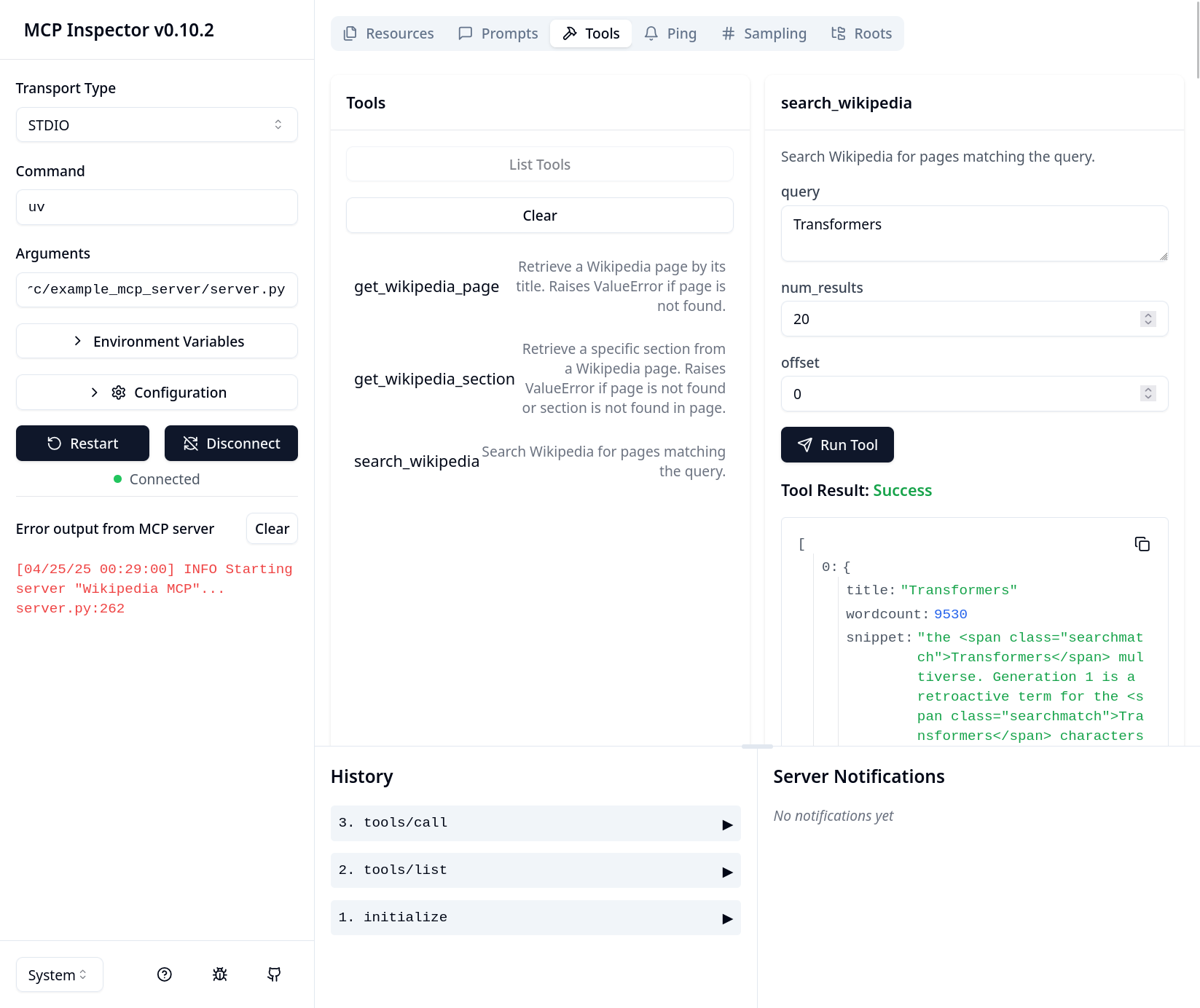
Nutzung unseres MCP-Servers mit einem Agenten
Lassen Sie uns unseren neu erstellten MCP-Server in einen tatsächlichen agentischen Workflow integrieren. Wir verwenden hierfür die smolagents-Bibliothek von Hugging Face.
# ./src/example_mcp_server/agent.py
import os
import sys
from pathlib import Path

from mcp import StdioServerParameters
from smolagents import OpenAIServerModel, ToolCollection, ToolCallingAgent


PROMP_TEMPLATE = """
You are a helpful AI assistant that answers questions based on Wikipedia information.

Always cite the source of the information you provide. Add a reference section at the end of your answer.

{question}
"""


def _build_server_args() -> StdioServerParameters:

    server_path = (
        Path(__file__).parents[2]
        / "src"
        / "example_mcp_server"
        / "server.py"
    )
    server_parameters = StdioServerParameters(
        command="mcp", args=["run", str(server_path.absolute())]
    )
    return server_parameters


def _ask_agent(model: OpenAIServerModel, question: str) -> None:
    server_parameters = _build_server_args()
    with ToolCollection.from_mcp(
        server_parameters=server_parameters, trust_remote_code=True
    ) as tool_collection:
        agent = ToolCallingAgent(tools=[*tool_collection.tools], model=model)

        agent.run(PROMP_TEMPLATE.format(question=question))


if __name__ == "__main__":
    openai_api_key = os.environ.get("OPENAI_API_KEY")

    if not openai_api_key:
        print("Error: OPENAI_API_KEY environment variable is required")
        sys.exit(1)

    model = OpenAIServerModel(model_id="gpt-4o")

    print("Wikipedia Assistant")
    print("Type 'exit', 'quit', or 'q' to end the program")

    while True:
        print("\n" + "-" * 50)
        question = input("Enter your question: ").strip()
        if question.lower() in ["exit", "quit", "q"]:
            print("Exiting program...")
            break

        if not question:
            print("Please enter a valid question.")
            continue

        print("-" * 50)
        _ask_agent(model, question)
        print("-" * 50)
Schauen wir uns an, wie gut es funktioniert:
> python src/example_mcp_server/agent.py
Wikipedia Assistant
Type 'exit', 'quit', or 'q' to end the program
--------------------------------------------------
Enter your question: What are the causes of the french revolution?
INFO Starting server "Wikipedia MCP"...
New run
You are a helpful AI assistant that answers questions based on Wikipedia information. Always cite the source of the information you provide. Add a reference section at the end of your answer. What are the causes of the french revolution?
OpenAIServerModel - gpt-4o
Step 1
Calling tool: 'get_wikipedia_section' with arguments:
{'page_title': 'Causes of the French Revolution', 'section_title': 'Main causes'}
Observations: Error executing tool get_wikipedia_section: Section 'Main causes' not found for page 'Causes of the French Revolution'.
[Step 1: Duration 1.27 seconds| Input tokens: 1,441 | Output tokens: 29]
Step 2
Calling tool: 'search_wikipedia' with arguments: {'query': 'Causes of the French Revolution'}
Observations: <long tool call output omitted>
[Step 2: Duration 1.27 seconds| Input tokens: 3,019 | Output tokens: 50]
Step 3
Calling tool: 'get_wikipedia_page' with arguments: {'page_title': 'Causes of the French Revolution', 'include_full_text': True}
Observations: <long tool call output omitted>
[Step 3: Duration 1.33 seconds| Input tokens: 7,446 | Output tokens: 79]
Step 4
Calling tool: 'final_answer' with arguments: {'answer': <final answer>}
Final answer: The causes of the French Revolution involve a complex combination of social, cultural, political, and economic factors:
1. Social Structure: French society was divided into three estates: the clergy (First Estate), the nobility (Second Estate), and the commoners (Third Estate). The third estate, which constituted 98% of the population, carried the burden of taxes and had little political power, leading to widespread discontent.
2. Financial Crisis: France's involvement in costly wars, such as the American War of Independence, deeply plunged the nation into debt. Inefficient taxation and financial systems compounded the issue, and attempts to reform taxes were blocked by the nobility-dominated parlements, creating a fiscal crisis.
3. Enlightenment Ideas: Ideas of liberty, equality, and fraternity, influenced by Enlightenment thinkers like Rousseau and Voltaire, fueled demands for political and social reform.
4. Economic Hardship: Poor harvests and subsequent increases in bread prices and cost of living placed greater strain on the already oppressed third estate. This economic hardship was felt acutely in urban centers, contributing to the mobilization of the sans-culottes and other groups.
5. Weak Monarchy: The diminishing power of the French monarchy under Louis XVI, coupled with ineffective financial management and a lack of reform, weakened the state's capacity to govern effectively. The monarchy's inability to manage or avert financial and social crises eventually led to widespread disillusionment and calls for change.
6. Cultural Change: The dissemination of Enlightenment ideas created a shift in societal values, challenging traditional authority and promoting new notions of governance and individual rights.
These factors, combined with specific events, served as catalysts for the revolution, resulting in a profound transformation of French society and government.
References:
Causes of the French Revolution - Wikipedia
[Step 4: Duration 8.16 seconds| Input tokens: 15,891 | Output tokens: 505]
Beachten Sie, dass unser Agent-Prompt nicht direkt spezifiziert hat, welche Tools wann zu verwenden sind. Der Agent erhielt lediglich die Liste der Tools inklusive ihrer Beschreibungen und entwarf selbstständig eine erfolgreiche Strategie. Leider gab es zu Beginn eine kleine Schwierigkeit: Er versuchte zuerst, einen nicht existierenden Abschnitt nachzuschlagen. Danach wechselte er jedoch zur Nutzung des Search-Tools, was anschaulich zeigt, wie widerstandsfähig moderne Agent-Toolkits gegenüber Fehlern sind.
Fazit
In diesem Blogbeitrag haben wir gesehen, wie das Model-Context-Protocol und seine Implementierung eine komfortable Möglichkeit bieten, KI-Agenten mit relevanten Kontextinformationen und funktionalen Fähigkeiten auszustatten.
Diesem Design liegt eine recht einfache, aber wirkungsvolle Idee zugrunde: Durch die Trennung der Tool-Definitionen von einem agentischen System werden diese für mehrere Agenten gleichzeitig verfügbar. Dies vereinfacht und verbessert agentische Designs enorm: SaaS-Anbieter oder interne Teams, die die Integration ihrer Produkte mit KI-Agenten verbessern möchten, können diese nun über MCP-Server bereitstellen und von einem reichhaltigen Ökosystem an MCP-Clients profitieren. Entwickelnde von agentischen Systemen wiederum können aus einer Vielzahl von MCP-Implementierungen wählen, die ihren Anforderungen entsprechen. Dies ist der Hauptgrund, warum die Anzahl der MCP-Server in den letzten Monaten rasant angestiegen ist (siehe z. B. diese Sammlung von MCP-Servern).
Obwohl MCP leistungsstarke Funktionen für die Tool-Integration bietet, ist zu beachten, dass sich die Sicherheitslandschaft rund um diese Server schnell weiterentwickelt. Wie bei jeder Technologie, die Funktionen für KI-Systeme zugänglich macht, sind Sicherheitsüberlegungen von zentraler Bedeutung. Anthropic hat vor Kurzem einen empfohlenen Authentifizierungs-Workflow zur Spezifikation hinzugefügt, um Bedenken hinsichtlich unbefugten Zugriffs auszuräumen. Unterdessen untersuchen Sicherheitsforschende weiterhin potenzielle Schwachstellen wie Tool-Poisoning durch Prompt-Injection-Angriffe. Diese Sicherheitsaspekte verdienen eine tiefergehende Untersuchung, die wir in einem zukünftigen Blogbeitrag thematisieren wollen.